Spam doesn’t usually come from hackers — it comes from your own sign-ups. Every “enter your email to continue” form is a potential source of promotional clutter down the line. The good news: a few simple habits, combined with a disposable email service, can keep your real inbox almost entirely spam-free.
1. Reserve Your Real Email for Things That Matter
Treat your primary inbox like a VIP list — banking, work, close contacts, and services you’ll use long-term. Everything else (one-time downloads, curiosity sign-ups, free trials) goes through a temporary address instead.
2. Use a Temporary Email for First-Time Sign-Ups
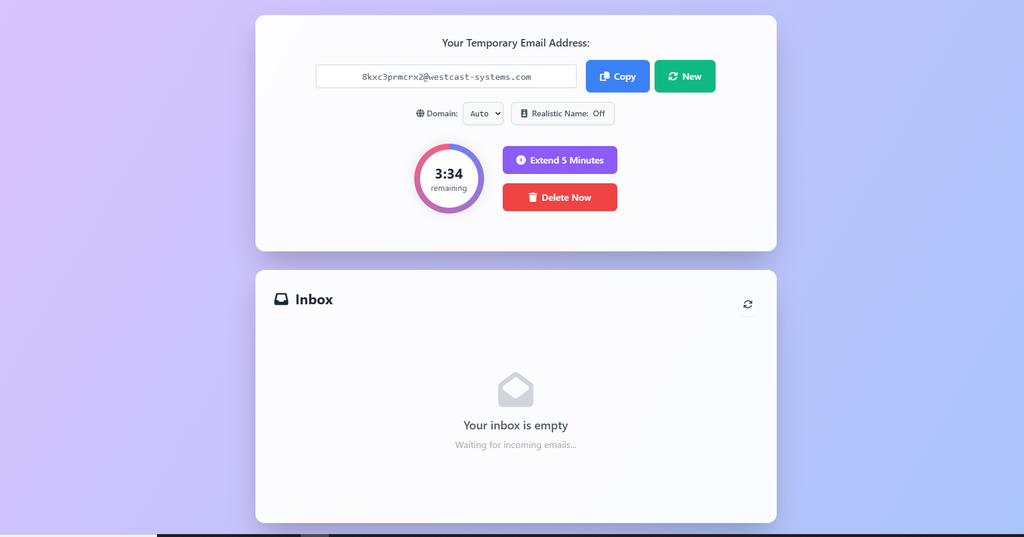
Not sure if you’ll actually use an app or service? Sign up with a temporary email like 5 Minute Mail first. If you decide to stick with it, you can always update your email later from account settings.
3. Never Reuse the Same Disposable Address Twice
Since temporary inboxes expire quickly, reusing the same address across multiple sign-ups defeats the purpose — and increases the chance of cross-contamination if one service shares or sells data. Generate a fresh one each time.
4. Avoid Disposable Email for Recovery-Sensitive Accounts
Banking apps, social media, and any account with password recovery tied to your email should always use a permanent, real address. Losing access to a self-destructed inbox means losing recovery options too.
5. Double-Check Before Submitting Forms
Some forms auto-subscribe you to marketing lists via a pre-checked box. Whether you’re using a real or temporary email, always scan for these checkboxes before hitting submit.
6. Extend the Timer Instead of Restarting
If you’re mid-signup and the countdown is running out, extend the session rather than generating a brand-new address — this avoids losing any verification emails already in transit.
7. Unsubscribe Where It Matters, Delegate Where It Doesn’t
For newsletters from services you genuinely use, unsubscribe manually. For everything else — one-off sign-ups, downloads, trials — let the temporary email handle it automatically by expiring on its own.
The Bigger Picture
Spam prevention isn’t about avoiding sign-ups altogether — it’s about being deliberate with which email address goes where. A disposable inbox acts as a filter between the internet and your real identity, so only the sign-ups you actually care about reach your main inbox.
Ready to try it? Generate a free temporary email in seconds — no registration required.
Frequently Asked Questions
Does using a temporary email stop all spam? It prevents spam from reaching your real inbox for that specific sign-up, but doesn’t affect emails you’ve already subscribed to elsewhere.
Is it safe to use disposable email regularly? Yes, for low-stakes sign-ups. Just avoid it for accounts involving money, identity, or long-term access.
What happens to old messages after the timer expires? They’re permanently deleted and cannot be recovered, which is part of what keeps the service private.